
WatchGuard Threat Detection (TDR) automatically senses cryptolocker and shutdown the node.
It is part of the WatchGuard Total Security Suite (rather than just the basic-security). This is one reason why WatchGuard Total Security Suite is priced higher.
At this time, TDR is now END-OF-LIFE (EOL) with the announcement here:
https://www.watchguard.com/wgrd-blog/end-life-timeline-tdr-starting-30-september-2023
https://www.watchguard.com/wgrd-blog/end-life-timeline-tdr-starting-30-september-2023
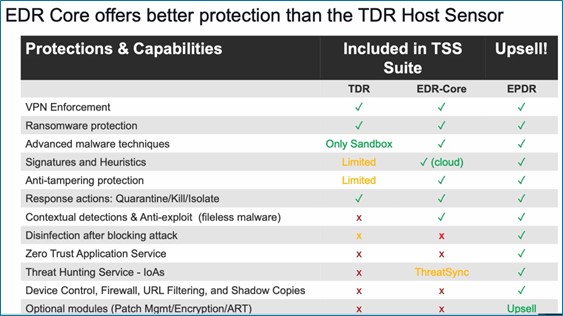
The recommended path is to upgrade TDR Host Sensors to WatchGuard Endpoint Security Detection & Remediation (EDR Core) with ThreatSync (XDR).
Inside the cloud, you can download a msi that will automatically connect back your Watchguard Cloud portal:
-MONITOR -> ENDPOINTS -> COMPUTERS -> ADD-COMPUTERS (on the right-hand side).
-MONITOR -> ENDPOINTS -> COMPUTERS -> ADD-COMPUTERS (on the right-hand side).
To get going:
-download the MSI.
-placed in your local repository (ie \\fs-officename-01\installs\apps\watchguard\edr)
-add the package to your DEPLOYMENT tool(s).
(no additional parameters are needed).
(no additional parameters are needed).
-deploy to your systems.
ADD FIREWALL POLICY EXCEPTIONS
You should already have a firewall policy that allows traffic from any-trusted-internal to external-partner-servers called OUTGOING-HTTP-ALLOWED & OUTGOING-HTTPS-ALLOWED. To add to the list:
-create an ALIAS for EXTERNAL-WATCHGUARD-SERVERS.
-add *.pandasecurity.com | *.pandasoftware.com | *.watchguard.com
-edit the OUTGOING-HTTP-ALLOWED and add EXTERNAL-WATCHGUARD-SERVERS.
-edit the OUTGOING-HTTP-ALLOWED and add EXTERNAL-WATCHGUARD-SERVERS.
-edit the OUTGOING-HTTPS-ALLOWED and add EXTERNAL-WATCHGUARD-SERVERS.
The Watchguard Cloud Portal will start to fill up with your systems where you can perform additional tasks and run reports.
Once connected, you can enable ThreatSync XDR. While EDR runs on the endpoint (laptop, desktop, etc), ThreatSync XDR extends this capability and corrolates the information together in a single cloud dashboard. You can enable ThreatSync XDR:
-MONITOR -> THREATS
EDR Core Licenses come with each Firebox:
| FIREBOX MODEL | EDR CORE LICENSES |
| T25 | 5 |
| T45 | 20 |
| T85 | 50 |
| M290 | 75 |
| M390 | 150 |
| M590 | 250 |
| M690 | 250 |
| M4800 | 250 |
| M5800 | 250 |
EDR-Core, EDR, XDR, EPP, EPDR, EPDR-Advanced, MDR, wow! Let's break this down.
EDR-Core & EDR
The version that comes with the Firebox Total Security is EDR-Core. This can be upgraded to EDR. This includes additional features like Threat-Hunting, Zero-Trust and Advanced Reporting Tools.
The version that comes with the Firebox Total Security is EDR-Core. This can be upgraded to EDR. This includes additional features like Threat-Hunting, Zero-Trust and Advanced Reporting Tools.
XDR
As above, XDR extends the EDR to the cloud for corrolation and reporting purposes.
As above, XDR extends the EDR to the cloud for corrolation and reporting purposes.
EPP
EDR works along side of Antivirus products. If you want, WatchGuard offers their own. WatchGuard EPP is traditional antivirus; basically Panda Antivirus since WatchGuard bought Panda Antivirus in March 2020.
EDR works along side of Antivirus products. If you want, WatchGuard offers their own. WatchGuard EPP is traditional antivirus; basically Panda Antivirus since WatchGuard bought Panda Antivirus in March 2020.
EPDR & EPDR-Advanced
When you have EPP and EDR, it is called EDPR. The reasoning behind this is that it is a single product performing 2 roles (EPP and EDR). This can be further upgrade to EDPR Advanced. This includes Advanced Threat Hunting and rules to search for indicators of compromise (IOC's).
When you have EPP and EDR, it is called EDPR. The reasoning behind this is that it is a single product performing 2 roles (EPP and EDR). This can be further upgrade to EDPR Advanced. This includes Advanced Threat Hunting and rules to search for indicators of compromise (IOC's).
MDR
And finally, Managed Detection and Response (MDR). This is a professional 24 hour operation center that helps you sleep. If you have the budget to staff and run a 24-hour opertion, that would be an option as well.
And finally, Managed Detection and Response (MDR). This is a professional 24 hour operation center that helps you sleep. If you have the budget to staff and run a 24-hour opertion, that would be an option as well.
NOTES:
You can see the difference between EDR Core, EDR, EPDR, EPDR Advaned:
https://www.watchguard.com/help/docs/help-center/en-US/Content/en-US/Endpoint-Security/_intro/edr-core-about.html
You can see the difference between EDR Core, EDR, EPDR, EPDR Advaned:
https://www.watchguard.com/help/docs/help-center/en-US/Content/en-US/Endpoint-Security/_intro/edr-core-about.html
You can see the updated list of urls and ip addresses used by WatchGuard products:
https://techsearch.watchguard.com/KB?type=Article&SFDCID=kA10H000000kCQ1SAM&lang=en_US
https://techsearch.watchguard.com/KB?type=Article&SFDCID=kA10H000000kCQ1SAM&lang=en_US
You can see the difference between STANDARD, BASIC-SECURITY, TOTAL-SECURITY here:
https://www.watchguard.com/wgrd-products/network-security/package-options
https://www.watchguard.com/wgrd-products/network-security/package-options