
While you typically interact with the internet and web sites with a Web-Browser (Edge, Chrome, Firefox, Safari, etc), you can also interact with the internet via shell (command-line, powershell, bash, etc.
WGET and CURL are included by default in recent versions of Windows 10 and Windows 11. Curl was included as a default component in Windows starting with Insider build 17063 of Windows 10, which was released in December 2017.
This means you can directly use CURL commands in the Command Prompt (CMD) or PowerShell (PS), similar to how you would in Linux.
Don't forget that PowerShell offers the Invoke-WebRequest (aka WGET), which provides similar functionality to CURL for making HTTP/HTTPS requests and interacting with web services. While WGET has a different syntax than CURL, it can be useful.
At this point in time and in our experience, PowerShell uses CURL as an alias for Invoke-WebRequest.
WGET
You can test WGET getting a web site with:
wget -v https://website-name-here
wget -v https://google.com
The return will show "STATUS 200" & "OK" when it reaches the site properly:
The return will timeout and error out when it does not reach the site:
CURL
You can test CURL getting a web site with:
c:\windows\system32\curl -v https://website-name-here
c:\windows\system32\curl -v https://google.com
The return will show "STATUS 200" & "OK" when it reaches the site properly: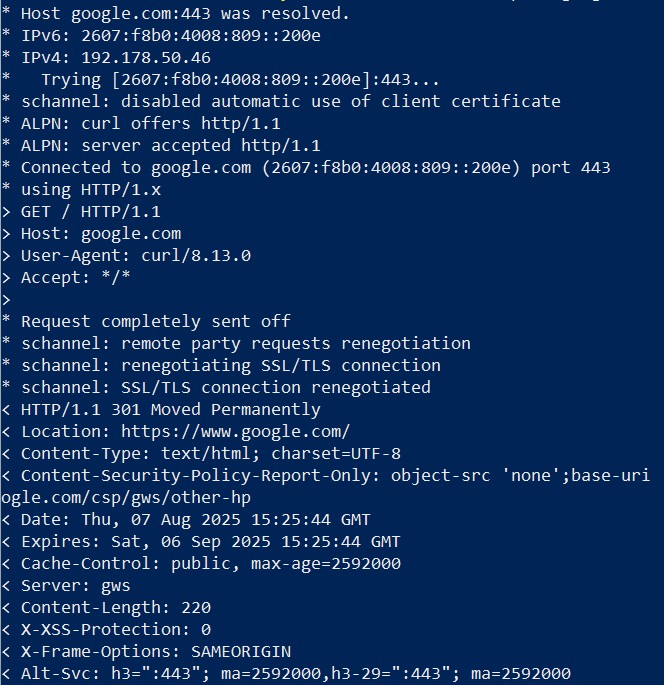
The return will timeout and show "Failed to Connect" out when it does not reach the site: